Overview of Rich Presence
Learn how to integrate Rich Presence to display activity information on user profiles.
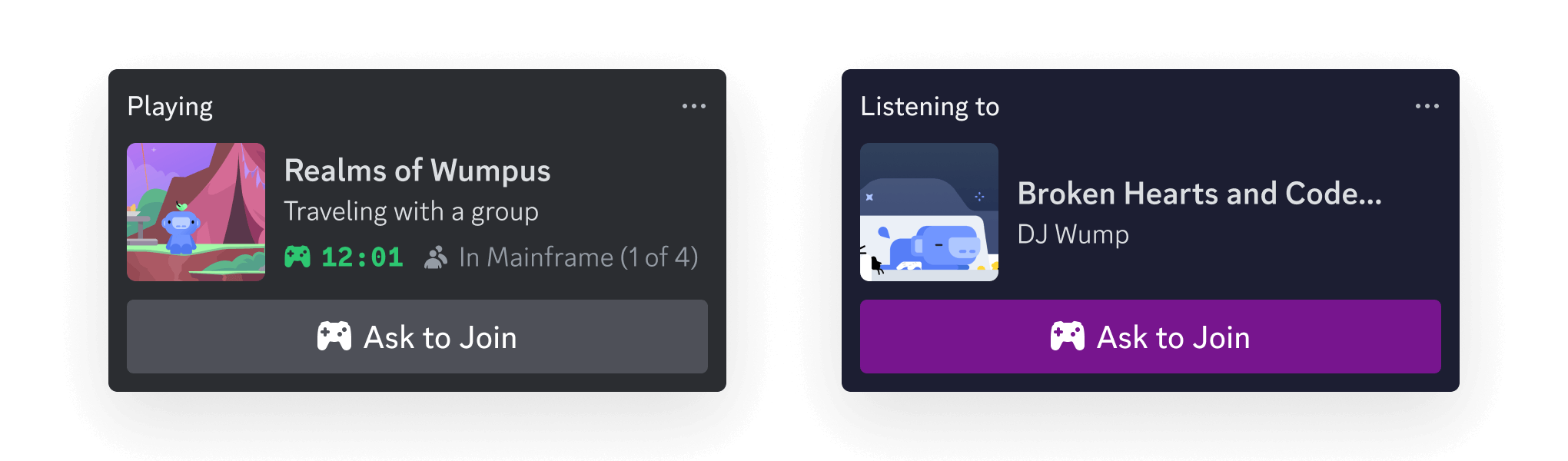
Rich Presence lets you display actionable data in a Discord user's profile about what they're up to in your game or app. The data you choose to display is up to you—whether it's a user's score, the duration they've been playing your game, what they're listening to on your platform, or something else.
Choosing an SDK
Section titled “Choosing an SDK”There are two options when integrating Rich Presence. Depending on what you're building, you'll want to choose the right SDK for your project:
- The Discord Social SDK allows you to build social features into your game or app, including friends lists, game invites, and more.
- The Embedded App SDK should be used if you're building an Activity in Discord.
Discord Social SDK
Section titled “Discord Social SDK”The Discord Social SDK is used for building social features directly into your game. When a user is playing your game, you can show what they're up to in their Discord profile and even prompt their friends to join in with game invites.
When integrating Rich Presence with an off-platform game, data can be shown about what a user is up to in your game. A "Join" button can also be configured to allow a user's friends to jump into their game and enable sending game invites.
Read about using Rich Presence with the Discord Social SDK
Embedded App SDK
Section titled “Embedded App SDK”The Embedded App SDK is used to build Activities, which are multiplayer games and social experiences hosted in an iframe within Discord. The SDK handles communication between Discord and the Activity and helps integrate platform features (like Rich Presence!).
After a user joins an Activity, Rich Presence can be used to dynamically show data about what that user is doing or playing, as well as prompt others to join in and play along.
Read about using Rich Presence with the Embedded App SDK
Start Building
Section titled “Start Building”Using Rich Presence with the Embedded App SDK
Guide on using Rich Presence in the Embedded App SDK while you're building an Activity
Using Rich Presence with the Discord Social SDK
Guide on using Rich Presence in the Discord Social SDK for your game
Designing your Data for Rich Presence
Best practices and launch checklist for when you're integrating Rich Presence with your game or app