Multiplayer Experience
Activity Instance Management
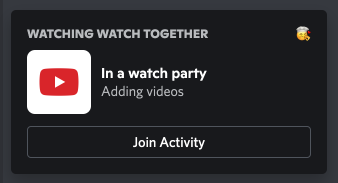
Section titled “Activity Instance Management”When a user clicks "Join Application", they expect to enter the same application that their friends are participating in. Whether the application is a shared drawing canvas, board game, collaborative playlist, or first-person shooter; the two users should have access to the same shared data. In this documentation, we refer to this shared data as an application instance.
The Embedded App SDK allows your app to talk bidirectionally with the Discord Client. The instanceId is necessary for your application, as well as Discord, to understand which unique instance of an application it is talking to.
Using instanceId
Section titled “Using instanceId”The instanceId attribute is available as soon as the SDK is constructed, and does not require the SDK to receive a ready payload from the Discord client.
import {DiscordSDK} from '@discord/embedded-app-sdk';
const discordSdk = new DiscordSDK(clientId);
// available immediately
const instanceId = discordSdk.instanceId;
The instanceId should be used as a key to save and load the shared data relevant to an application. This ensures that two users who are in the same application instance have access to the same shared data.
Semantics of instanceId
Section titled “Semantics of instanceId”Instance IDs are generated when a user launches an application. Any users joining the same application will receive the same instanceId. When all the users of an application in a channel leave or close the application, that instance has finished its lifecycle, and will not be used again. The next time a user opens the application in that channel, a new instanceId will be generated.
Instance Participants
Section titled “Instance Participants”Instance Participants are any Discord user actively connected to the same Application Instance. This data can be fetched or subscribed to.
import {DiscordSDK, Events, type Types} from '@discord/embedded-app-sdk';

const discordSdk = new DiscordSDK('...');
await discordSdk.ready();

// Fetch
const participants = await discordSdk.commands.getInstanceConnectedParticipants();

// Subscribe
function updateParticipants(participants: Types.GetActivityInstanceConnectedParticipantsResponse) {
  // Do something really cool
}
discordSdk.subscribe(Events.ACTIVITY_INSTANCE_PARTICIPANTS_UPDATE, updateParticipants);
// Unsubscribe
discordSdk.unsubscribe(Events.ACTIVITY_INSTANCE_PARTICIPANTS_UPDATE, updateParticipants);
Render Avatars and Names
Section titled “Render Avatars and Names”Check out detailed documentation on where and how Discord stores common image assets here.
Here's a basic example for retrieving a user's avatar and username
// We'll be referencing the user object returned from authenticate
const {user} = await discordSdk.commands.authenticate({
  access_token: accessToken,
});

let avatarSrc = '';
if (user.avatar) {
  avatarSrc = `https://cdn.discordapp.com/avatars/${user.id}/${user.avatar}.png?size=256`;
} else {
  const defaultAvatarIndex = (BigInt(user.id) >> 22n) % 6n;
  avatarSrc = `https://cdn.discordapp.com/embed/avatars/${defaultAvatarIndex}.png`
}

const username = user.global_name ?? `${user.username}#${user.discriminator}`;

// Then in your HTML/JSX/etc...
<img alt="avatar" src={avatarSrc} />
<p>{username}</p>
Rendering guild-specific avatars and nicknames
Section titled “Rendering guild-specific avatars and nicknames”In order to retrieve a user's guild-specific avatar and nickname, your application must request the guilds.members.read scope. Note, this only grants the information for that instance of the application's user. To display the guild-specific avatar/nickname for all application users, any info retrieved from guilds.members.read scope'd API calls must be shared via your application's server.
Here's an example of how to retrieve the user's guild-specific avatar and nickname:
// We'll be referencing the user object returned from authenticate
const {user} = await discordSdk.commands.authenticate({
  access_token: accessToken,
});

// When using the proxy, you may instead replace `https://discord.com` with `/discord`
// or whatever url mapping you have chosen via the developer portal
fetch(`https://discord.com/api/users/@me/guilds/${discordSdk.guildId}/member`, {
  method: 'GET',
  headers: {
    Authorization: `Bearer ${accessToken}`,
  },
})
  .then((response) => {
    return response.json();
  })
  .then((guildsMembersRead) => {
    let guildAvatarSrc = '';
    // Retrieve the guild-specific avatar, and fallback to the user's avatar
    if (guildsMembersRead?.avatar) {
      guildAvatarSrc = `https://cdn.discordapp.com/guilds/${discordSdk.guildId}/users/${user.id}/avatars/${guildsMembersRead.avatar}.png?size=256`;
    } else if (user.avatar) {
      guildAvatarSrc = `https://cdn.discordapp.com/avatars/${user.id}/${user.avatar}.png?size=256`;
    } else {
      const defaultAvatarIndex = (BigInt(user.id) >> 22n) % 6n;
      avatarSrc = `https://cdn.discordapp.com/embed/avatars/${defaultAvatarIndex}.png`;
    }

    // Retrieve the guild-specific nickname, and fallback to the username#discriminator
    const guildNickname = guildsMembersRead?.nick ?? (user.global_name ?? `${user.username}#${user.discriminator}`);
  });
This example is being done entirely on the client, however, a more common pattern is to instead, do the following:
- Store the user's access token on the application server
- Retrieve the user's guild-specific avatar and nickname via the application's server
- Serve all of the application's avatar/nicknames via the application's server
Preventing unwanted activity sessions
Section titled “Preventing unwanted activity sessions”Activities are surfaced through iframes in the Discord app. The activity website itself is publicly reachable at <application_id>.discordsays.com. Activities will expect to be able to communicate with Discord's web or mobile client via the Discord SDK's RPC protocol. If a user loads the activity's website in a normal browser, the Discord RPC server will not be present, and the activity will likely fail in some way.
It is theoretically possible for a malicious client to mock Discord's RPC protocol or load one activity website when launching another. Because the activity is loaded inside Discord, the RPC protocol is active, and the activity is none the wiser.
Using the Activity Instance API
Section titled “Using the Activity Instance API”To enable an activity to "lock down" activity access, we encourage utilizing the get_activity_instance API, found at discord.com/api/applications/<application_id>/activity-instances/<instance_id>'. The route requires a Bot token of the application. It returns a serialized active activity instance for the given application, if found, otherwise it returns a 404. Here are two example responses:
curl https://discord.com/api/applications/1215413995645968394/activity-instances/i-1234567890-gc-912952092627435520-912954213460484116 -H 'Authorization: Bot <bot token>'
{"message": "404: Not Found", "code": 0}

curl https://discord.com/api/applications/1215413995645968394/activity-instances/i-1276580072400224306-gc-912952092627435520-912954213460484116 -H 'Authorization: Bot <bot token>'
{"application_id":"1215413995645968394","instance_id":"i-1276580072400224306-gc-912952092627435520-912954213460484116","launch_id":"1276580072400224306","location":{"id":"gc-912952092627435520-912954213460484116","kind":"gc","channel_id":"912954213460484116","guild_id":"912952092627435520"},"users":["205519959982473217"]}
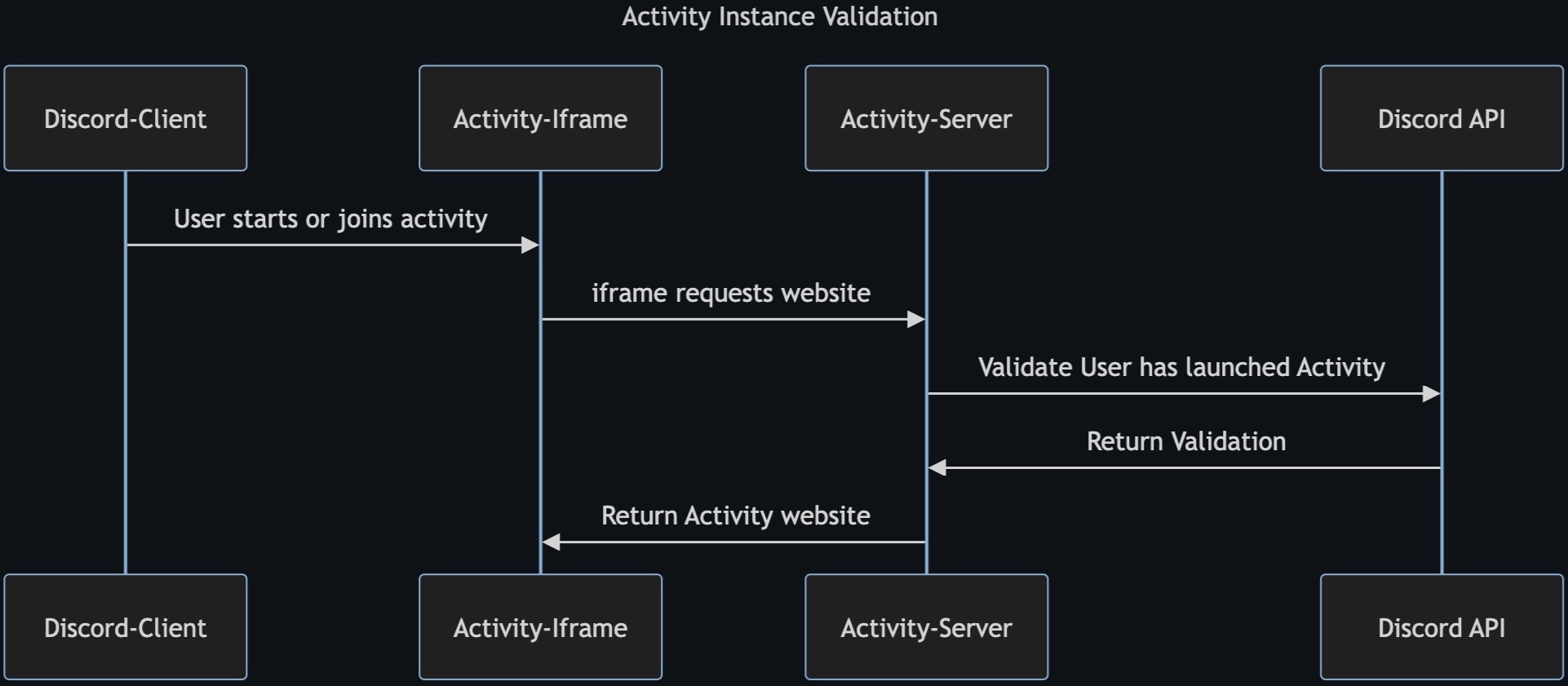
With this API, the activity's backend can verify that a client is in fact in an instance of that activity before allowing the client to participate in any meaningful gameplay. How an activity implements "session verification" is left to the developer's discretion. The solution can be as granular as gating specific features or as binary as not returning the activity HTML except for valid sessions.
Validating Proxy Request Headers
Section titled “Validating Proxy Request Headers”For apps that want additional security validation, Discord provides an optional proxy authentication system. When your embedded app makes requests through Discord's proxy, each request can include cryptographic headers that prove the request's authenticity.
Each proxy-authenticated request is sent with the following headers:
X-Signature-Ed25519as a cryptographic signatureX-Signature-Timestampas a Unix timestampX-Discord-Proxy-Payloadas a base64-encoded payload containing user context
If you choose to use proxy authentication, you can validate these headers to ensure requests are legitimate. If the signature fails validation, your app should respond with a 401 error code.
Validating Proxy Headers
Below are some code examples that show how to validate the headers sent in proxy-authenticated requests.
JavaScript
const nacl = require("tweetnacl");

// Your public key can be found on your application in the Developer Portal
const PUBLIC_KEY = "APPLICATION_PUBLIC_KEY";

const signature = req.get("X-Signature-Ed25519");
const timestamp = req.get("X-Signature-Timestamp");
const payload = req.get("X-Discord-Proxy-Payload");

// Decode the base64 payload
const payloadBytes = Buffer.from(payload, "base64");
const payloadString = payloadBytes.toString("utf-8");
const payloadData = JSON.parse(payloadString);

// Verify timestamp matches payload
if (payloadData.created_at.toString() !== timestamp) {
    return res.status(401).end("invalid request timestamp");
}

// Check if token has expired
if (payloadData.expires_at < Math.floor(Date.now() / 1000)) {
    return res.status(401).end("expired proxy token");
}

// Verify the signature using tweetnacl
const isVerified = nacl.sign.detached.verify(
    payloadBytes,
    Buffer.from(signature, "base64"),
    Buffer.from(PUBLIC_KEY, "hex")
);

if (!isVerified) {
    return res.status(401).end("invalid request signature");
}
Python
import json
import base64
import time
from nacl.signing import VerifyKey
from nacl.exceptions import BadSignatureError

# Your public key can be found on your application in the Developer Portal
PUBLIC_KEY = 'APPLICATION_PUBLIC_KEY'

verify_key = VerifyKey(bytes.fromhex(PUBLIC_KEY))

signature = request.headers["X-Signature-Ed25519"]
timestamp = request.headers["X-Signature-Timestamp"]
payload = request.headers["X-Discord-Proxy-Payload"]

# Decode the base64 payload
payload_bytes = base64.b64decode(payload)
payload_string = payload_bytes.decode('utf-8')
payload_data = json.loads(payload_string)

# Verify timestamp matches payload
if str(payload_data['created_at']) != timestamp:
    abort(401, 'invalid request timestamp')

# Check if token has expired
if payload_data['expires_at'] < int(time.time()):
    abort(401, 'expired proxy token')

try:
    verify_key.verify(payload_bytes, bytes.fromhex(signature))
except BadSignatureError:
    abort(401, 'invalid request signature')
Proxy authentication is entirely optional and provided as an additional security layer for apps that choose to implement it.
In the below flow diagram, we show how the server can deliver the activity website, only for valid users in a valid activity instance: