Growth and Referrals
Prompting Users to Share Incentivized Links
Section titled “Prompting Users to Share Incentivized Links”Incentivized sharing can help grow your Activity through network effects. You can use links in several different ways such as:
- Referral links. Users can copy referral links inside your Activity, which include their Discord user ID (
https://discord.com/activities/<your Activity ID>?referrer_id=123456789), and they can send to their friends. If their friend accepts and starts playing your game, then you gift the referrer something inside your game. - Promotions. You can run a temporary promotion on social media, where you offer a reward if they start playing now. Share a custom link on your social media (
https://discord.com/activities/<your Activity ID>?custom_id=social012025). Anyone who clicks that specific link receives something inside your game. - Social deep-links. Currently, when users launch an Activity, they all land in the same place. Instead, you can start deep-linking to contextually relevant points in your game. For example, user A can copy a link inside your Activity for engaging other users (
https://discord.com/activities/<your Activity ID>?referrer_id=123456789&custom_id=visit-location), and sends the link to their friends in a DM or channel. Then, user B who clicks the link gets taken directly to user A’s location. - Turn-based deep-links. When you send an “it’s your turn” DM to a user, you can include a link which takes them directly to the right game instance and the turn they need to take.
- Affiliate marketing. You can work with affiliates (influencers, companies, etc) to advertise your game to their followings, and reward them via a custom link (
https://discord.com/activities/<your Activity ID>?custom_id=influencer1). Then, for every user that starts playing because of said influencer, you can then pay out to the influencer. - Source attribution. You can use the
custom_idparameter to figure out how much traffic you’re getting from different marketing sources.
This guide covers implementing a referral link which will feature a reward system for users who share links and those who click them.
Implementation Overview
Section titled “Implementation Overview”- Create and track an incentivized link for a promotional campaign, then prompt users to share the link
- Handle incoming referrals and grant valid rewards
Sharing Links
Section titled “Sharing Links”When implementing sharing, you'll need to:
- Generate a unique ID for tracking the promotion
- Call the
shareLinkcommand - Track the share attempt
// Generate a unique ID for this promotion
// This could be per-campaign, per-user, or per-share depending on your needs
const customId = await createPromotionalCustomId();

try {
    const { success } = await discordSdk.commands.shareLink({
        message: 'Click this link to redeem 5 free coins!',
        custom_id: customId,
    });

    if (success) {
        // Track successful share for analytics/limiting
        await trackSuccessfulShare(customId);
    }
} catch (error) {
    // Handle share failures appropriately
    console.error('Failed to share link:', error);
}
Handling Incoming Referrals
Section titled “Handling Incoming Referrals”When a user clicks a shared link, your activity will launch with referral data available through the SDK:
// Early in your activity's initialization
async function handleReferral() {
    // Validate the referral data
    if (!discordSdk.customId || !discordSdk.referrerId) {
        return;
    }

    try {
        // Verify this is a valid promotion and hasn't expired
        const promotion = await validatePromotion(discordSdk.customId);
        if (!promotion) {
            console.log('Invalid or expired promotion');
            return;
        }

        // Prevent self-referrals
        if (discordSdk.referrerId === currentUserId) {
            console.log('Self-referrals not allowed');
            return;
        }

        // Grant rewards to both users
        await grantRewards({
            promotionId: discordSdk.customId,
            referrerId: discordSdk.referrerId,
            newUserId: currentUserId
        });
    } catch (error) {
        console.error('Failed to process referral:', error);
    }
}
Link Sharing Best Practices
Section titled “Link Sharing Best Practices”- Generate unique, non-guessable
customIds - Track and validate referrals to prevent abuse
- Handle edge cases like expired promotions gracefully
- Consider implementing cool-down periods between shares
- Do not override the
referrer_idquery parameter directly. When present,referrer_idis expected to be a Discord snowflake-type user ID, otherwise it will be set to the message's author id.
Creating and Managing Custom Incentivized Links
Section titled “Creating and Managing Custom Incentivized Links”This guide covers creating a customizable Incentivized Link through the dev portal, and then retrieving the link to be able to share it off-platform. Incentivized Links are used to customize how the embed appears to users.
Creating a Link
Section titled “Creating a Link”- In your Application's portal, visit the Custom Links page under the Activities heading in the navigation pane.
- On the Custom Links page, click
Create Newto create a new link. - You will need to upload an image with an aspect ratio of 43:24.
- Title, and description are also required.
custom_idis an optional field, an explicitcustom_idquery parameter on the link itself will always override the setcustom_id.- Click Save.
Editing a Link
Section titled “Editing a Link”- Click on a row to open up the modal with all of the data loaded in ready for your edits.
- Change the description to something else.
- Click Update.
Copying a Link
Section titled “Copying a Link”Once you're satisfied with your changes you can click on the copy icon on the row, it'll change colors to green indicating that it copied to your clipboard. You are now able to share this link anywhere. The link will look like: https://discord.com/activities/<your Activity ID>?link_id=0-123456789. Even if you've set a custom_id, it won't be explicitly included in the link but will be loaded once a user clicks on the link. You can then further shorten this URL if you'd like.
Deleting a Link
Section titled “Deleting a Link”- Click on the trash icon on the row of the link you're trying to delete.
- You'll have a confirm dialog pop up.
Best Practices
Section titled “Best Practices”- Generate unique, non-guessable
customIds - Track and validate referrals to prevent abuse
- Gracefully handle expirations in your activity for any custom links that are limited time but still live off-platform.
User Experience
Section titled “User Experience”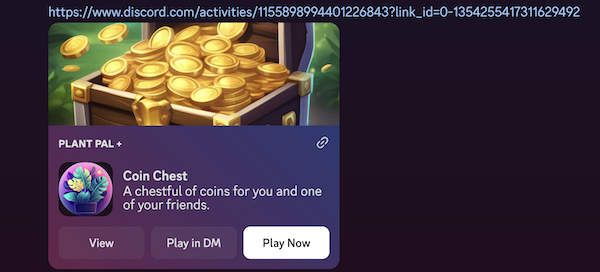
Users will see an embed with your information displayed. Clicking "Play" opens the activity and passes through the custom_id you've set. A referrer_id will be present for links shared on Discord.
Generating a Custom Link Within Your Activity
Section titled “Generating a Custom Link Within Your Activity”This guide covers creating a customizable Incentivized Link within your activity, and using the shareLink API to share the link.
- Allows you to customize the way the link is presented to users via the embed
- Can be generated on-demand within your activity
- Ephemeral, 30 day TTL
- Does not show up in the developer portal
Generating a Link
Section titled “Generating a Link”// Convert an image array buffer to base64 string
const image = base64EncodedImage;
// Generate the quick activity link
const linkIdResponse = await fetch(`${env.discordAPI}/applications/${env.applicationId}/quick-links/`, {
method: 'POST',
headers: {
Authorization: `Bearer ${accessToken}`,
'Content-Type': 'application/json',
},
body: {
custom_id: 'user_123/game_456',
description: 'I just beat level 10 with a perfect score',
title: 'Check out my high score!',
image,
}
});
const {link_id} = await linkIdResponse.json();
// Open the Share modal with the generated link
const {success} = await discordSdk.commands.shareLink({
message: 'Check out my high score!',
link_id,
});
success ? console.log('User shared link!') : console.log('User did not share link!');