Application Commands
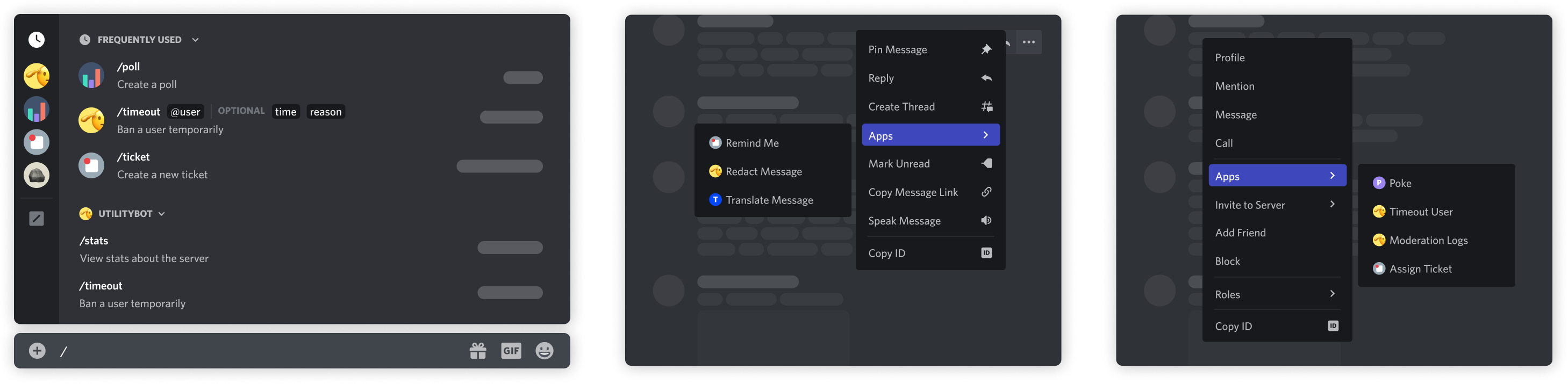
Application commands are native ways to interact with apps in the Discord client. There are 3 types of commands accessible in different interfaces: the chat input, a message's context menu (top-right menu or right-clicking in a message), and a user's context menu (right-clicking on a user).
Application Command Object
Section titled “Application Command Object”Application Command Naming
Section titled “Application Command Naming”CHAT_INPUT command names and command option names must match the following regex ^[-_\u02BC\p{L}\p{N}\p{sc=Deva}\p{sc=Thai}]{1,32}$ with the unicode flag set. If there is a lowercase variant of any letters used, you must use those. Characters with no lowercase variants and/or uncased letters are still allowed. USER and MESSAGE commands may be mixed case and can include spaces.
Application Command Structure
Section titled “Application Command Structure”| Field | Type | Description | Valid Types |
|---|---|---|---|
| id | snowflake | Unique ID of command | all |
| type? | one of command types | Type of command, defaults to 1 |
all |
| application_id | snowflake | ID of the parent application | all |
| guild_id? | snowflake | Guild ID of the command, if not global | all |
| name | string | Name of command, 1-32 characters | all |
| name_localizations? | ?dictionary with keys in available locales | Localization dictionary for name field. Values follow the same restrictions as name |
all |
| description | string | Description for CHAT_INPUT and PRIMARY_ENTRY_POINT commands, 1-100 characters. Empty string for USER and MESSAGE commands |
all |
| description_localizations? | ?dictionary with keys in available locales | Localization dictionary for description field. Values follow the same restrictions as description |
all |
| options? * | array of command options | Parameters for the command, max of 25 | CHAT_INPUT |
| default_member_permissions | ?string | Set of permissions represented as a bit set | all |
| dm_permission? | boolean | Deprecated (use contexts instead); Indicates whether the command is available in DMs with the app, only for globally-scoped commands. By default, commands are visible. |
all |
| default_permission? | ?boolean | Not recommended for use as field will soon be deprecated. Indicates whether the command is enabled by default when the app is added to a guild, defaults to true |
all |
| nsfw? | boolean | Indicates whether the command is age-restricted, defaults to false |
all |
| integration_types? | list of integration types | Installation contexts where the command is available, only for globally-scoped commands. Defaults to your app's configured contexts | all |
| contexts? | ?list of interaction context types | Interaction context(s) where the command can be used, only for globally-scoped commands. | all |
| version | snowflake | Autoincrementing version identifier updated during substantial record changes | all |
| handler? | one of command handler types | Determines whether the interaction is handled by the app's interactions handler or by Discord | PRIMARY_ENTRY_POINT |
* options can only be set for application commands of type CHAT_INPUT.
* handler can only be set for application commands of type PRIMARY_ENTRY_POINT for applications with the EMBEDDED flag (i.e. applications that have an Activity).
Application Command Types
Section titled “Application Command Types”| Name | Type | Description |
|---|---|---|
| CHAT_INPUT | 1 | Slash commands; a text-based command that shows up when a user types / |
| USER | 2 | A UI-based command that shows up when you right click or tap on a user |
| MESSAGE | 3 | A UI-based command that shows up when you right click or tap on a message |
| PRIMARY_ENTRY_POINT | 4 | A UI-based command that represents the primary way to invoke an app's Activity |
Application Command Option Structure
Section titled “Application Command Option Structure”| Field | Type | Description | Valid Option Types |
|---|---|---|---|
| type | one of application command option type | Type of option | all |
| name * | string | 1-32 character name | all |
| name_localizations? | ?dictionary with keys in available locales | Localization dictionary for the name field. Values follow the same restrictions as name |
all |
| description | string | 1-100 character description | all |
| description_localizations? | ?dictionary with keys in available locales | Localization dictionary for the description field. Values follow the same restrictions as description |
all |
| required? | boolean | Whether the parameter is required or optional, default false |
all but SUB_COMMAND and SUB_COMMAND_GROUP |
| choices? | array of application command option choice | Choices for the user to pick from, max 25 | STRING, INTEGER, NUMBER |
| options? | array of application command option | If the option is a subcommand or subcommand group type, these nested options will be the parameters or subcommands respectively; up to 25 | SUB_COMMAND , SUB_COMMAND_GROUP |
| channel_types? | array of channel types | The channels shown will be restricted to these types | CHANNEL |
| min_value? | integer for INTEGER options, double for NUMBER options |
The minimum value permitted | INTEGER , NUMBER |
| max_value? | integer for INTEGER options, double for NUMBER options |
The maximum value permitted | INTEGER , NUMBER |
| min_length? | integer | The minimum allowed length (minimum of 0, maximum of 6000) |
STRING |
| max_length? | integer | The maximum allowed length (minimum of 1, maximum of 6000) |
STRING |
| autocomplete? ** | boolean | If autocomplete interactions are enabled for this option | STRING, INTEGER, NUMBER |
| file_types?*** | array of strings | File types to filter for; can be image, video, audio, or any dot-prefixed extension such as .pdf; max 10 |
ATTACHMENT |
* name must be unique within an array of application command options.
** autocomplete may not be set to true if choices are present.
*** file_types only matches against the file extension. See File Type Filtering for details.
Application Command Option Type
Section titled “Application Command Option Type”| Name | Value | Note |
|---|---|---|
| SUB_COMMAND | 1 | |
| SUB_COMMAND_GROUP | 2 | |
| STRING | 3 | |
| INTEGER | 4 | Any integer between -2^53+1 and 2^53-1 |
| BOOLEAN | 5 | |
| USER | 6 | |
| CHANNEL | 7 | Includes all channel types + categories |
| ROLE | 8 | |
| MENTIONABLE | 9 | Includes users and roles |
| NUMBER | 10 | Any double between -2^53 and 2^53 |
| ATTACHMENT | 11 | attachment object |
Application Command Option Choice Structure
Section titled “Application Command Option Choice Structure”| Field | Type | Description |
|---|---|---|
| name | string | 1-100 character choice name |
| name_localizations? | ?dictionary with keys in available locales | Localization dictionary for the name field. Values follow the same restrictions as name |
| value | string, integer, or double * | Value for the choice, up to 100 characters if string |
* Type of value depends on the option type that the choice belongs to.
Entry Point Command Handler Types
Section titled “Entry Point Command Handler Types”| Name | Value | Note |
|---|---|---|
| APP_HANDLER | 1 | The app handles the interaction using an interaction token |
| DISCORD_LAUNCH_ACTIVITY | 2 | Discord handles the interaction by launching an Activity and sending a follow-up message without coordinating with the app |
Details about Entry Point command handler types are in the Entry Point handlers section.
Authorizing Your Application
Section titled “Authorizing Your Application”Application commands do not depend on a bot user in the guild; they use the interactions model. To create commands in a guild, your app must be authorized with the applications.commands scope which can be used independently, but is also automatically included with the bot scope.
When requesting this scope, we "shortcut" the OAuth2 flow similar to adding a bot. You don't need to complete the flow, exchange for a token, or any of that.
If your application does not require a bot user in the guild for its commands to work, you don't need to add the bot scope or a permission bitfield to the URL.
Registering a Command
Section titled “Registering a Command”Commands can be scoped either globally or to a specific guild. Global commands are available for every guild that adds your app. An individual app's global commands are also available in DMs if that app has a bot that shares a mutual guild with the user.
Guild commands are specific to the guild you specify when making them. Guild commands are not available in DMs. Command names are unique per application, per type, within each scope (global and guild). That means:
- Your app cannot have two global
CHAT_INPUTcommands with the same name - Your app cannot have two guild
CHAT_INPUTcommands within the same name on the same guild - Your app cannot have two global
USERcommands with the same name - Your app can have a global and guild
CHAT_INPUTcommand with the same name - Your app can have a global
CHAT_INPUTandUSERcommand with the same name - Your app cannot have a
PRIMARY_ENTRY_POINTguild command - Multiple apps can have commands with the same names
This list is non-exhaustive. In general, remember that command names must be unique per application, per type, and within each scope (global and guild).
An app can have the following number of commands:
- 100 global
CHAT_INPUTcommands - 15 global
USERcommands - 15 global
MESSAGEcommands - 1 global
PRIMARY_ENTRY_POINTcommand
For all command types except PRIMARY_ENTRY_POINT, you can have the same amount of guild-specific commands per guild.
Making a Global Command
Section titled “Making a Global Command”Global commands are available on all your app's guilds.
Global commands have inherent read-repair functionality. That means that if you make an update to a global command, and a user tries to use that command before it has updated for them, Discord will do an internal version check and reject the command, and trigger a reload for that command.
To make a global command, make an HTTP POST call like this:
import requests


url = "https://discord.com/api/v10/applications/<my_application_id>/commands"

# This is an example CHAT_INPUT or Slash Command, with a type of 1
json = {
    "name": "blep",
    "type": 1,
    "description": "Send a random adorable animal photo",
    "options": [
        {
            "name": "animal",
            "description": "The type of animal",
            "type": 3,
            "required": True,
            "choices": [
                {
                    "name": "Dog",
                    "value": "animal_dog"
                },
                {
                    "name": "Cat",
                    "value": "animal_cat"
                },
                {
                    "name": "Penguin",
                    "value": "animal_penguin"
                }
            ]
        },
        {
            "name": "only_smol",
            "description": "Whether to show only baby animals",
            "type": 5,
            "required": False
        }
    ]
}

# For authorization, you can use either your bot token
headers = {
    "Authorization": "Bot <my_bot_token>"
}

# or a client credentials token for your app with the applications.commands.update scope
headers = {
    "Authorization": "Bearer <my_credentials_token>"
}

r = requests.post(url, headers=headers, json=json)
Making a Guild Command
Section titled “Making a Guild Command”Guild commands are available only within the guild specified on creation. Guild commands update instantly. We recommend you use guild commands for quick testing, and global commands when they're ready for public use.
To make a guild command, make a similar HTTP POST call, but scope it to a specific guild_id:
import requests


url = "https://discord.com/api/v10/applications/<my_application_id>/guilds/<guild_id>/commands"

# This is an example USER command, with a type of 2
json = {
    "name": "High Five",
    "type": 2
}

# For authorization, you can use either your bot token
headers = {
    "Authorization": "Bot <my_bot_token>"
}

# or a client credentials token for your app with the applications.commands.update scope
headers = {
    "Authorization": "Bearer <my_credentials_token>"
}

r = requests.post(url, headers=headers, json=json)
Updating and Deleting a Command
Section titled “Updating and Deleting a Command”Commands can be deleted and updated by making DELETE and PATCH calls to the command endpoint. Those endpoints are
applications/<my_application_id>/commands/<command_id>for global commands, orapplications/<my_application_id>/guilds/<guild_id>/commands/<command_id>for guild commands
Because commands have unique names within a type and scope, we treat POST requests for new commands as upserts. That means making a new command with an already-used name for your application will update the existing command.
Detailed documentation about application command endpoints and their parameters are in the endpoints section.
Contexts
Section titled “Contexts”Commands have two sets of contexts on the application command object that let you to configure when and where it can be used:
integration_typesdefines the installation contexts that a command supportscontextsdefines the interaction contexts where a command can be used
Details for both types of command contexts are in the sections below.
Installation Context
Section titled “Installation Context”The installation context is where your app was installed—to a server, a user, or both. If your app supports both installation contexts, there may be cases where you want some of your app's commands to only be available for one or the other. For example, maybe your app has a /profile command that is only relevant when it's installed to a user.
A command's supported installation context(s) can be set using the integration_types field when creating or updating a command as long as any included contexts are already supported on the application-level.
A command's value for integration_types may affect which interaction contexts a command is visible in.
Interaction Contexts
Section titled “Interaction Contexts”The interaction contexts for a command determines where in the Discord client it can be used, and can be configured by setting the contexts field when creating or updating a command.
There are three interaction context types that correspond to different surfaces: GUILD (0), BOT_DM (1), and PRIVATE_CHANNEL (2). However, the PRIVATE_CHANNEL interaction context is only meaningful for commands installed to a user (when the command's integration_types includes USER_INSTALL).
Permissions
Section titled “Permissions”Application command permissions allow your app to enable or disable commands for up to 100 users, roles, and channels within a guild. Command permissions can also be updated by users in the client if they have the necessary permissions.
A command's current permissions can be retrieved using the GET /applications/{application.id}/guilds/{guild.id}/commands/{command.id}/permissions endpoint. The response will include an array called permissions with associated IDs and permission types.
Command permissions can be updated with the PUT /applications/{application.id}/guilds/{guild.id}/commands/{command.id}/permissions endpoint. To call the endpoint, apps must use a Bearer token that's authorized with the applications.commands.permissions.update scope from a user with sufficient permissions. For their permissions to be considered sufficient, all of the following must be true for the authenticating user (not your app or bot user):
- Has permission to Manage Guild and Manage Roles in the guild where the command is being edited
- Has the ability to run the command being edited
- Has permission to manage the resources that will be affected (roles, users, and/or channels depending on the permission types)
Syncing and Unsyncing Permissions
Section titled “Syncing and Unsyncing Permissions”The command permissions interface can be accessed in the client by navigating to Server Settings > Integrations, then clicking Manage to the right of an installed app. At the top of the interface, users can edit permissions for a specific user, role, or channel. By default, these top-level permissions will apply to all of an app's commands. However, each permission can also be unsynced and customized for individual commands to provide more granular control.
When the permissions for a specific command are unsynced, meaning it doesn't align with the top-level permissions, the interface will display "Not Synced" to users.
Application Command Permissions Object
Section titled “Application Command Permissions Object”Guild Application Command Permissions Structure
Section titled “Guild Application Command Permissions Structure”Returned when fetching the permissions for an app's command(s) in a guild.
| Field | Type | Description |
|---|---|---|
| id | snowflake | ID of the command or the application ID |
| application_id | snowflake | ID of the application the command belongs to |
| guild_id | snowflake | ID of the guild |
| permissions | array of application command permissions | Permissions for the command in the guild, max of 100 |
When the id field is the application ID instead of a command ID, the permissions apply to all commands that do not contain explicit overwrites.
Application Command Permissions Structure
Section titled “Application Command Permissions Structure”Application command permissions allow you to enable or disable commands for specific users, roles, or channels within a guild.
| Field | Type | Description |
|---|---|---|
| id | snowflake | ID of the role, user, or channel. It can also be a permission constant |
| type | application command permission type | role (1), user (2), or channel (3) |
| permission | boolean | true to allow, false, to disallow |
Application Command Permissions Constants
Section titled “Application Command Permissions Constants”The following constants can be used in the id field for command permissions payloads.
| Permission | Value | Type | Description |
|---|---|---|---|
@everyone |
guild_id |
snowflake | All members in a guild |
| All Channels | guild_id - 1 |
snowflake | All channels in a guild |
Application Command Permission Type
Section titled “Application Command Permission Type”| Name | Value |
|---|---|
| ROLE | 1 |
| USER | 2 |
| CHANNEL | 3 |
To allow for fine-tuned access to commands, application command permissions are supported for guild and global commands of all types. Guild members and apps with the necessary permissions can allow or deny specific users and roles from using a command, or toggle commands for entire channels.
Similar to how threads inherit user and role permissions from the parent channel, any command permissions for a channel will apply to the threads it contains.
Using Default Permissions
Section titled “Using Default Permissions”Default permissions can be added to a command during creation using the default_member_permissions and context fields. Adding default permissions doesn't require any Bearer token since it's configured during command creation and isn't targeting specific roles, users, or channels.
The default_member_permissions field can be used when creating a command to set the permissions a user must have to use it. The value for default_member_permissions is a bitwise OR-ed set of permissions, serialized as a string. Setting it to "0" will prohibit anyone in a guild from using the command unless a specific overwrite is configured or the user has admin permissions.
You can also include BOT_DM (1) in contexts when setting a global command's interaction contexts to control whether it can be run in DMs with your app. Guild commands don't support the BOT_DM interaction context.
Example of editing permissions
Section titled “Example of editing permissions”As an example, the following command would not be usable by anyone except admins in any guilds by default:
{
    "name": "permissions_test",
    "description": "A test of default permissions",
    "type": 1,
    "default_member_permissions": "0"
}
Or this would enable it just for users that have the MANAGE_GUILD permission:
permissions = str(1 << 5)

command = {
    "name": "permissions_test",
    "description": "A test of default permissions",
    "type": 1,
    "default_member_permissions": permissions
}
And the following would disable a command for a specific channel:
A_SPECIFIC_CHANNEL = "<channel_id>"
url = "https://discord.com/api/v10/applications/<application_id>/guilds/<my_guild_id>/commands/<my_command_id>/permissions"

json = {
    "permissions": [
        {
            "id": A_SPECIFIC_CHANNEL,
            "type": 3,
            "permission": False
        }
    ]
}

headers = {
    "Authorization": "Bearer <my_bearer_token>"
}

r = requests.put(url, headers=headers, json=json)
Slash Commands
Section titled “Slash Commands”Slash commands—the CHAT_INPUT type—are a type of application command. They're made up of a name, description, and a block of options, which you can think of like arguments to a function. The name and description help users find your command among many others, and the options validate user input as they fill out your command.
Slash commands can also have groups and subcommands to further organize commands. More on those later.
Example Slash Command
Section titled “Example Slash Command”{
"name": "blep",
"type": 1,
"description": "Send a random adorable animal photo",
"options": [
{
"name": "animal",
"description": "The type of animal",
"type": 3,
"required": true,
"choices": [
{
"name": "Dog",
"value": "animal_dog"
},
{
"name": "Cat",
"value": "animal_cat"
},
{
"name": "Penguin",
"value": "animal_penguin"
}
]
},
{
"name": "only_smol",
"description": "Whether to show only baby animals",
"type": 5,
"required": false
}
]
}When someone uses a slash command, your application will receive an interaction:
Example Interaction
Section titled “Example Interaction”Slash Command Interaction
{
    "type": 2,
    "token": "A_UNIQUE_TOKEN",
    "member": {
        "user": {
            "id": "53908232506183680",
            "username": "Mason",
            "avatar": "a_d5efa99b3eeaa7dd43acca82f5692432",
            "discriminator": "1337",
            "public_flags": 131141
        },
        "roles": ["539082325061836999"],
        "premium_since": null,
        "permissions": "2147483647",
        "pending": false,
        "nick": null,
        "mute": false,
        "joined_at": "2017-03-13T19:19:14.040000+00:00",
        "is_pending": false,
        "deaf": false
    },
    "id": "786008729715212338",
    "guild_id": "290926798626357999",
    "app_permissions": "442368",
    "guild_locale": "en-US",
    "locale": "en-US",
    "data": {
        "options": [{
            "type": 3,
            "name": "cardname",
            "value": "The Gitrog Monster"
        }],
        "type": 1,
        "name": "cardsearch",
        "id": "771825006014889984"
    },
    "channel_id": "645027906669510667"
}
Subcommands and Subcommand Groups
Section titled “Subcommands and Subcommand Groups”For those developers looking to make more organized and complex groups of commands, look no further than subcommands and groups.
Subcommands organize your commands by specifying actions within a command or group.
Subcommand Groups organize your subcommands by grouping subcommands by similar action or resource within a command.
These are not enforced rules. You are free to use subcommands and groups however you'd like; it's just how we think about them.
We support nesting one level deep within a group, meaning your top level command can contain subcommand groups, and those groups can contain subcommands. That is the only kind of nesting supported. Here's some visual examples:
VALID

command
|
|__ subcommand
|
|__ subcommand

----

VALID

command
|
|__ subcommand-group
    |
    |__ subcommand
|
|__ subcommand-group
    |
    |__ subcommand

----

VALID

command
|
|__ subcommand-group
    |
    |__ subcommand
|
|__ subcommand

-------

INVALID

command
|
|__ subcommand-group
    |
    |__ subcommand-group
|
|__ subcommand-group
    |
    |__ subcommand-group

----

INVALID

command
|
|__ subcommand
    |
    |__ subcommand-group
|
|__ subcommand
    |
    |__ subcommand-group
Example Walkthrough
Section titled “Example Walkthrough”Let's look at an example. Let's imagine you run a moderation bot. You want to make a /permissions command that can do the following:
- Get the guild permissions for a user or a role
- Get the permissions for a user or a role on a specific channel
- Change the guild permissions for a user or a role
- Change the permissions for a user or a role on a specific channel
We'll start by defining the top-level information for /permissions:
{
    "name": "permissions",
    "description": "Get or edit permissions for a user or a role",
    "options": []
}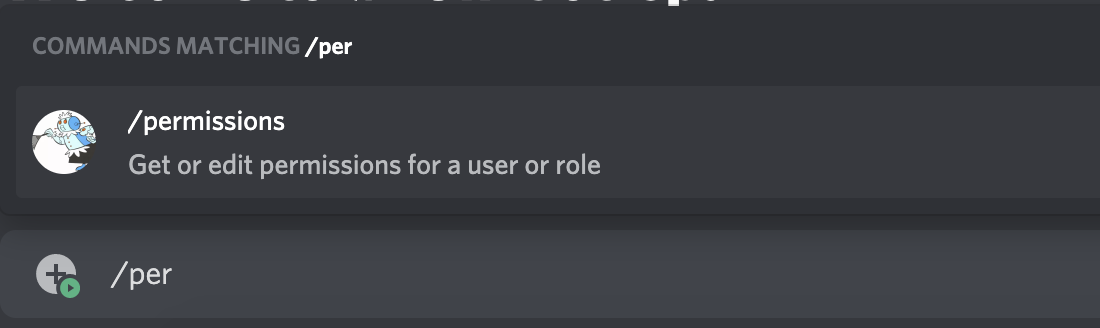
Now we have a command named permissions. We want this command to be able to affect users and roles. Rather than making two separate commands, we can use subcommand groups. We want to use subcommand groups here because we are grouping commands on a similar resource: user or role.
{
    "name": "permissions",
    "description": "Get or edit permissions for a user or a role",
    "options": [
        {
            "name": "user",
            "description": "Get or edit permissions for a user",
            "type": 2 // 2 is type SUB_COMMAND_GROUP
        },
        {
            "name": "role",
            "description": "Get or edit permissions for a role",
            "type": 2
        }
    ]
}
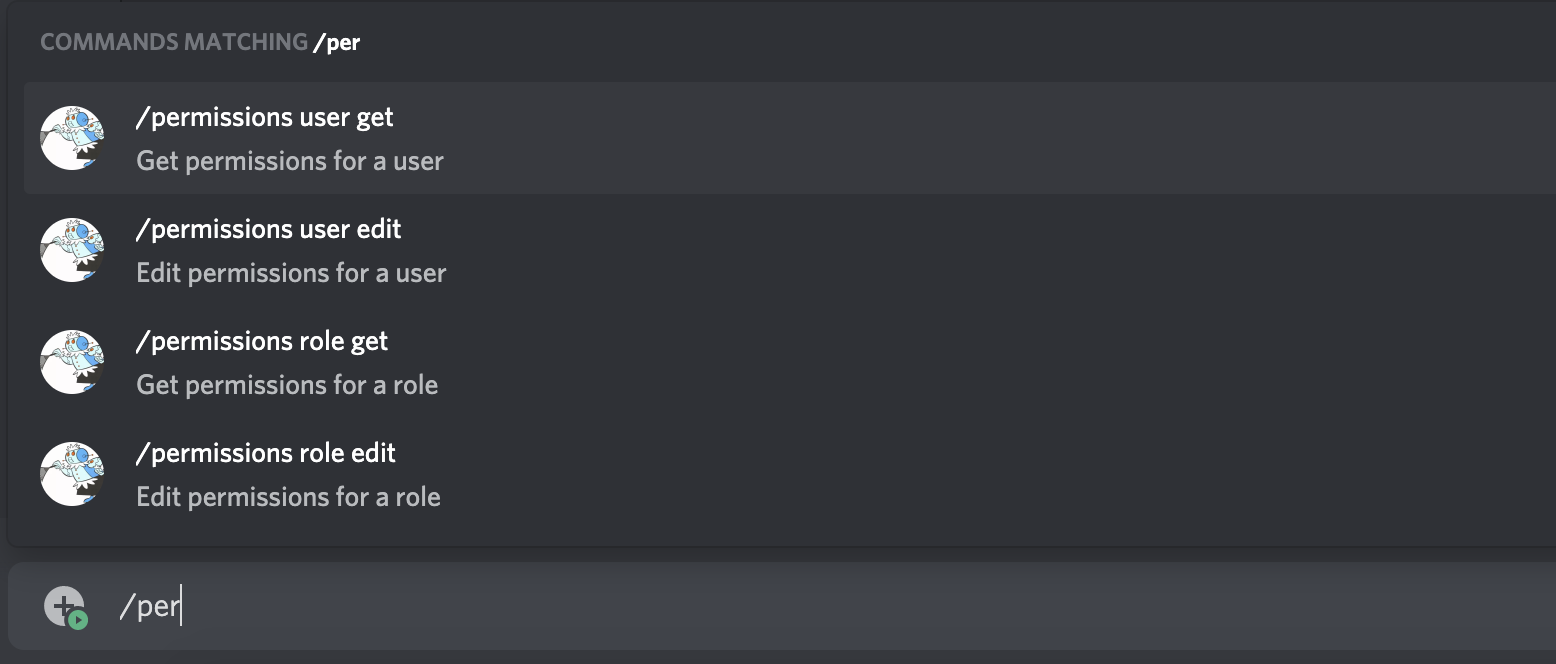
You'll notice that a command like this will not show up in the command explorer. That's because groups are effectively "folders" for commands, and we've made two empty folders. So let's continue.
Now that we've effectively made user and role "folders", we want to be able to either get and edit permissions. Within the subcommand groups, we can make subcommands for get and edit:
{
    "name": "permissions",
    "description": "Get or edit permissions for a user or a role",
    "options": [
        {
            "name": "user",
            "description": "Get or edit permissions for a user",
            "type": 2, // 2 is type SUB_COMMAND_GROUP
            "options": [
                {
                    "name": "get",
                    "description": "Get permissions for a user",
                    "type": 1 // 1 is type SUB_COMMAND
                },
                {
                    "name": "edit",
                    "description": "Edit permissions for a user",
                    "type": 1
                }
            ]
        },
        {
            "name": "role",
            "description": "Get or edit permissions for a role",
            "type": 2,
            "options": [
                {
                    "name": "get",
                    "description": "Get permissions for a role",
                    "type": 1
                },
                {
                    "name": "edit",
                    "description": "Edit permissions for a role",
                    "type": 1
                }
            ]
        }
    ]
}
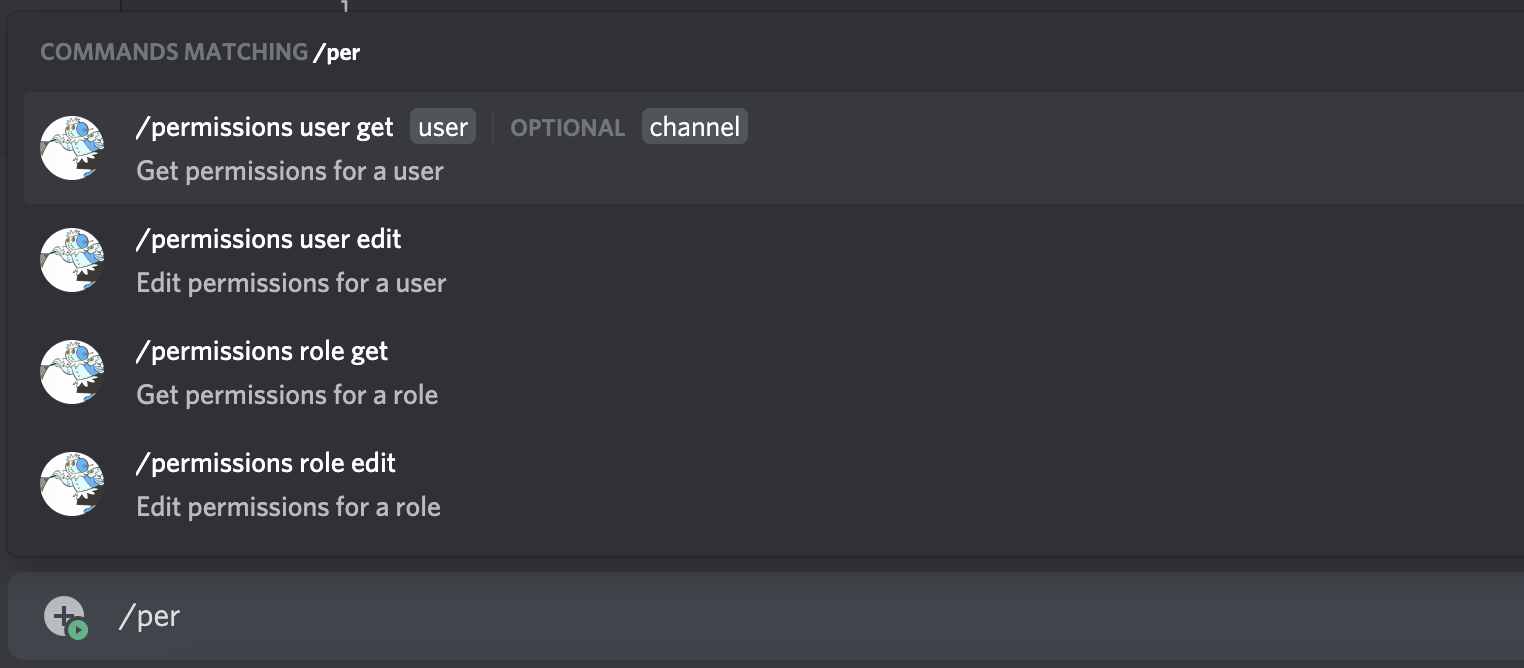
Now, we need some arguments! If we chose user, we need to be able to pick a user; if we chose role, we need to be able to pick a role. We also want to be able to pick between guild-level permissions and channel-specific permissions. For that, we can use optional arguments:
{
    "name": "permissions",
    "description": "Get or edit permissions for a user or a role",
    "options": [
        {
            "name": "user",
            "description": "Get or edit permissions for a user",
            "type": 2, // 2 is type SUB_COMMAND_GROUP
            "options": [
                {
                    "name": "get",
                    "description": "Get permissions for a user",
                    "type": 1, // 1 is type SUB_COMMAND
                    "options": [
                        {
                            "name": "user",
                            "description": "The user to get",
                            "type": 6, // 6 is type USER
                            "required": true
                        },
                        {
                            "name": "channel",
                            "description": "The channel permissions to get. If omitted, the guild permissions will be returned",
                            "type": 7, // 7 is type CHANNEL
                            "required": false
                        }
                    ]
                },
                {
                    "name": "edit",
                    "description": "Edit permissions for a user",
                    "type": 1,
                    "options": [
                        {
                            "name": "user",
                            "description": "The user to edit",
                            "type": 6,
                            "required": true
                        },
                        {
                            "name": "channel",
                            "description": "The channel permissions to edit. If omitted, the guild permissions will be edited",
                            "type": 7,
                            "required": false
                        }
                    ]
                }
            ]
        },
        {
            "name": "role",
            "description": "Get or edit permissions for a role",
            "type": 2,
            "options": [
                {
                    "name": "get",
                    "description": "Get permissions for a role",
                    "type": 1,
                    "options": [
                        {
                            "name": "role",
                            "description": "The role to get",
                            "type": 8, // 8 is type ROLE
                            "required": true
                        },
                        {
                            "name": "channel",
                            "description": "The channel permissions to get. If omitted, the guild permissions will be returned",
                            "type": 7,
                            "required": false
                        }
                    ]
                },
                {
                    "name": "edit",
                    "description": "Edit permissions for a role",
                    "type": 1,
                    "options": [
                        {
                            "name": "role",
                            "description": "The role to edit",
                            "type": 8,
                            "required": true
                        },
                        {
                            "name": "channel",
                            "description": "The channel permissions to edit. If omitted, the guild permissions will be edited",
                            "type": 7,
                            "required": false
                        }
                    ]
                }
            ]
        }
    ]
}
And, done! The JSON looks a bit complicated, but what we've ended up with is a single command that can be scoped to multiple actions, and then further scoped to a particular resource, and then even further scope with optional arguments. Here's what it looks like all put together.
User Commands
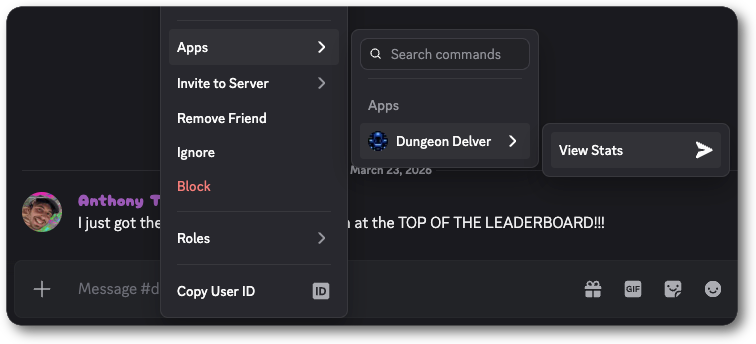
Section titled “User Commands”User commands are application commands that appear on the context menu (right click or tap) of users. They're a great way to surface quick actions for your app that target users. They don't take any arguments, and will return the user on whom you clicked or tapped in the interaction response.
Example User Command
Section titled “Example User Command”{
"name": "View Stats",
"type": 2
}
When someone uses a user command, your application will receive an interaction:
Example Interaction
Section titled “Example Interaction”User Command Interaction
{
    "application_id": "775799577604522054",
    "channel_id": "772908445358620702",
    "data": {
        "id": "866818195033292850",
        "name": "context-menu-user-2",
        "resolved": {
            "members": {
                "809850198683418695": {
                    "avatar": null,
                    "is_pending": false,
                    "joined_at": "2021-02-12T18:25:07.972000+00:00",
                    "nick": null,
                    "pending": false,
                    "permissions": "246997699136",
                    "premium_since": null,
                    "roles": []
                }
            },
            "users": {
                "809850198683418695": {
                    "avatar": "afc428077119df8aabbbd84b0dc90c74",
                    "bot": true,
                    "discriminator": "7302",
                    "id": "809850198683418695",
                    "public_flags": 0,
                    "username": "VoltyDemo"
                }
            }
        },
        "target_id": "809850198683418695",
        "type": 2
    },
    "guild_id": "772904309264089089",
    "guild_locale": "en-US",
    "app_permissions": "442368",
    "id": "867794291820986368",
    "locale": "en-US",
    "member": {
        "avatar": null,
        "deaf": false,
        "is_pending": false,
        "joined_at": "2020-11-02T20:46:57.364000+00:00",
        "mute": false,
        "nick": null,
        "pending": false,
        "permissions": "274877906943",
        "premium_since": null,
        "roles": ["785609923542777878"],
        "user": {
            "avatar": "a_f03401914fb4f3caa9037578ab980920",
            "discriminator": "6538",
            "id": "167348773423415296",
            "public_flags": 1,
            "username": "ian"
        }
    },
    "token": "UNIQUE_TOKEN",
    "type": 2,
    "version": 1
}
Message Commands
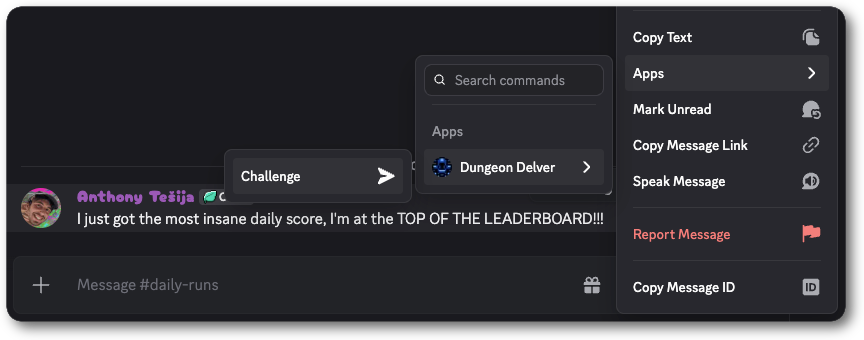
Section titled “Message Commands”Message commands are application commands that appear on the context menu (right click or tap) of messages. They're a great way to surface quick actions for your app that target messages. They don't take any arguments, and will return the message on whom you clicked or tapped in the interaction response.
Example Message Command
Section titled “Example Message Command”{
"name": "Challenge",
"type": 3
}
When someone uses a message command, your application will receive an interaction:
Example Interaction
Section titled “Example Interaction”Message Command Interaction
{
    "application_id": "775799577604522054",
    "channel_id": "772908445358620702",
    "data": {
        "id": "866818195033292851",
        "name": "context-menu-message-2",
        "resolved": {
            "messages": {
                "867793854505943041": {
                    "attachments": [],
                    "author": {
                        "avatar": "a_f03401914fb4f3caa9037578ab980920",
                        "discriminator": "6538",
                        "id": "167348773423415296",
                        "public_flags": 1,
                        "username": "ian"
                    },
                    "channel_id": "772908445358620702",
                    "components": [],
                    "content": "some message",
                    "edited_timestamp": null,
                    "embeds": [],
                    "flags": 0,
                    "id": "867793854505943041",
                    "mention_everyone": false,
                    "mention_roles": [],
                    "mentions": [],
                    "pinned": false,
                    "timestamp": "2021-07-22T15:42:57.744000+00:00",
                    "tts": false,
                    "type": 0
                }
            }
        },
        "target_id": "867793854505943041",
        "type": 3
    },
    "guild_id": "772904309264089089",
    "guild_locale": "en-US",
    "app_permissions": "442368",
    "id": "867793873336926249",
    "locale": "en-US",
    "member": {
        "avatar": null,
        "deaf": false,
        "is_pending": false,
        "joined_at": "2020-11-02T20:46:57.364000+00:00",
        "mute": false,
        "nick": null,
        "pending": false,
        "permissions": "274877906943",
        "premium_since": null,
        "roles": ["785609923542777878"],
        "user": {
            "avatar": "a_f03401914fb4f3caa9037578ab980920",
            "discriminator": "6538",
            "id": "167348773423415296",
            "public_flags": 1,
            "username": "ian"
        }
    },
    "token": "UNIQUE_TOKEN",
    "type": 2,
    "version": 1
}
Entry Point Commands
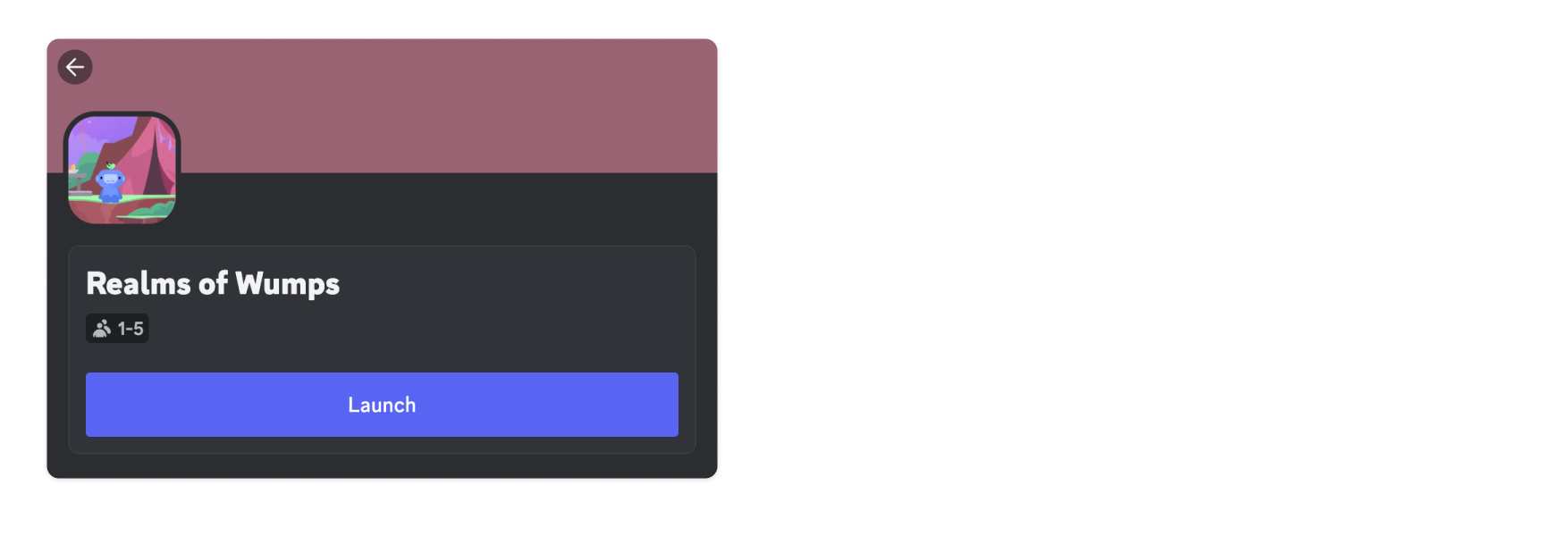
Section titled “Entry Point Commands”An Entry Point command serves as the primary way for users to open an app's Activity from the App Launcher.
For the Entry Point command to be visible to users, an app must have Activities enabled.
Example Entry Point Command
Section titled “Example Entry Point Command”{
"name": "launch",
"description": "Launch Racing with Friends",
"type": 4,
"handler": 2
}Entry Point handlers
Section titled “Entry Point handlers”When a user invokes an app's Entry Point command, the value of handler will determine how the interaction is handled:
- For
APP_HANDLER(1), the app is responsible for responding to the interaction. It can respond by launching the app's associated Activity using theLAUNCH_ACTIVITY(type12) interaction callback type, or take another action (like sending a follow-up message in channel). - For
DISCORD_LAUNCH_ACTIVITY(2), Discord will handle the interaction automatically by launching the associated Activity and sending a message to the channel where it was launched.
Default Entry Point command
Section titled “Default Entry Point command”When you enable Activities, an Entry Point command (named "Launch") is automatically created for your app with DISCORD_LAUNCH_ACTIVITY (2) set as the Entry Point handler. You can retrieve details for the automatically-created command, like its ID, by calling the Get Global Application Commands endpoint and looking for the "Launch" command.
Details about updating or replacing the default Entry Point command is in the Setting Up an Entry Point Command guide.
Autocomplete
Section titled “Autocomplete”Autocomplete interactions allow your application to dynamically return option suggestions to a user as they type.
An autocomplete interaction can return partial data for option values. Your application will receive partial data for any existing user input, as long as that input passes client-side validation. For example, you may receive partial strings, but not invalid numbers. The option the user is currently typing will be sent with a focused: true boolean field and options the user has already filled will also be sent but without the focused field. This is a special case where options that are otherwise required might not be present, due to the user not having filled them yet.
{
  "type": 4,
  "data": {
    "id": "816437322781949972",
    "name": "airhorn",
    "type": 1,
    "version": "847194950382780532",
    "options": [
      {
        "type": 3,
        "name": "variant",
        "value": "data a user is typ",
        "focused": true
      }
    ]
  }
}
Localization
Section titled “Localization”Application commands can be localized, which will cause them to use localized names and descriptions depending on the client's selected language. This is entirely optional. Localization is available for names and descriptions of commands, subcommands, and options, as well as the names of choices, by submitting the appropriate name_localizations and description_localizations fields when creating or updating the application command.
Application commands may be partially localized - not all available locales are required, nor do different fields within a command need to support the same set of locales. If a locale is not present in a localizations dictionary for a field, users in that locale will see the default value for that field. It's not necessary to fill out all locales with the default value. Any localized values that are identical to the default will be ignored.
Localized option names are subject to an additional constraint, which is that they must be distinct from all other default option names of that command, as well as all other option names within that locale on that command.
When taking advantage of command localization, the interaction payload received by your client will still use default command, subcommand, and option names. To localize your interaction response, you can determine the client's selected language by using the locale key in the interaction payload.
An application command furnished with localizations might look like this:
{
  "name": "birthday",
  "type": 1,
  "description": "Wish a friend a happy birthday",
  "name_localizations": {
    "zh-CN": "生日",
    "el": "γενέθλια"
  },
  "description_localizations": {
    "zh-CN": "祝你朋友生日快乐"
  },
  "options": [
    {
      "name": "age",
      "type": 4,
      "description": "Your friend's age",
      "name_localizations": {
        "zh-CN": "岁数"
      },
      "description_localizations": {
        "zh-CN": "你朋友的岁数"
      }
    }
  ]
}
Locale fallbacks
Section titled “Locale fallbacks”For application commands, there are built-in fallbacks in case a user's locale isn't present in the localizations. If the fallback locale is also missing, it will use the default.
| Locale | Fallback |
|---|---|
| en-US | en-GB |
| en-GB | en-US |
| es-419 | es-ES |
Retrieving localized commands
Section titled “Retrieving localized commands”While most endpoints that return application command objects will return the name_localizations and description_localizations fields, some will not by default. This includes GET endpoints that return all of an application's guild or global commands. Instead, those endpoints will supply additional name_localized or description_localized fields, which only contain the localization relevant to the requester's locale. (The full dictionaries can still be obtained by supplying the appropriate query argument).
For example, if a batch GET request were made with locale zh-CN, including the above command, the returned object would look as follows:
{
  "name": "birthday",
  "type": 1,
  "description": "Wish a friend a happy birthday",
  "name_localized": "生日",
  "description_localized": "祝你朋友生日快乐",
  "options": [
    {
      "name": "age",
      "type": 4,
      "description": "Your friend's age",
      "name_localized": "岁数",
      "description_localized": "你朋友的岁数",
    }
  ]
}
If the requester's locale is not found in a localizations dictionary, then the corresponding name_localization or description_localization for that field will also not be present.
Locale is determined by looking at the X-Discord-Locale header, then the Accept-Language header if not present, then lastly the user settings locale.
Age-Restricted Commands
Section titled “Age-Restricted Commands”A command that contains age-restricted content should have the nsfw field set to true upon creation or update. Marking a command as age-restricted will limit who can see and access the command, and from which channels.
Using Age-Restricted Commands
Section titled “Using Age-Restricted Commands”To use an age-restricted command, a user must be 18 years or older and access the command from either:
- an age-restricted channel or
- a DM with the app after enabling age-restricted commands within their User Settings.
Details about accessing and using age-restricted commands is in the Help Center.
Endpoints
Section titled “Endpoints”Get Global Application Commands
Section titled “Get Global Application Commands”/applications/{application.id}/commands
Fetch all of the global commands for your application. Returns an array of application command objects.
Query String Params
Section titled “Query String Params”| Field | Type | Description |
|---|---|---|
| with_localizations? | boolean | Whether to include full localization dictionaries (name_localizations and description_localizations) in the returned objects, instead of the name_localized and description_localized fields. Default false. |
Create Global Application Command
Section titled “Create Global Application Command”/applications/{application.id}/commands
Create a new global command. Returns 201 if a command with the same name does not already exist, or a 200 if it does (in which case the previous command will be overwritten). Both responses include an application command object.
JSON Params
Section titled “JSON Params”| Field | Type | Description |
|---|---|---|
| name | string | Name of command, 1-32 characters |
| name_localizations? | ?dictionary with keys in available locales | Localization dictionary for the name field. Values follow the same restrictions as name |
| description? | string | 1-100 character description for CHAT_INPUT and PRIMARY_ENTRY_POINT commands |
| description_localizations? | ?dictionary with keys in available locales | Localization dictionary for the description field. Values follow the same restrictions as description |
| options? | array of application command option | Parameters for the command, max of 25. Only for CHAT_INPUT commands |
| default_member_permissions? | ?string | Set of permissions represented as a bit set |
| dm_permission? | ?boolean | Deprecated (use contexts instead); Indicates whether the command is available in DMs with the app, only for globally-scoped commands. By default, commands are visible. |
| default_permission? | boolean | Replaced by default_member_permissions and will be deprecated in the future. Indicates whether the command is enabled by default when the app is added to a guild. Defaults to true |
| integration_types? | list of integration types | Installation context(s) where the command is available |
| contexts? | list of interaction context types | Interaction context(s) where the command can be used |
| type? | one of application command type | Type of command, defaults 1 if not set |
| nsfw? | boolean | Indicates whether the command is age-restricted |
| handler? | one of entry point command handler types | Determines whether the interaction is handled by the app's interactions handler or by Discord. Only for PRIMARY_ENTRY_POINT commands |
Get Global Application Command
Section titled “Get Global Application Command”/applications/{application.id}/commands/{command.id}
Fetch a global command for your application. Returns an application command object.
Edit Global Application Command
Section titled “Edit Global Application Command”/applications/{application.id}/commands/{command.id}
Edit a global command. Returns 200 and an application command object. All fields are optional, but any fields provided will entirely overwrite the existing values of those fields.
JSON Params
Section titled “JSON Params”| Field | Type | Description |
|---|---|---|
| name? | string | Name of command, 1-32 characters |
| name_localizations? | ?dictionary with keys in available locales | Localization dictionary for the name field. Values follow the same restrictions as name |
| description? | string | 1-100 character description |
| description_localizations? | ?dictionary with keys in available locales | Localization dictionary for the description field. Values follow the same restrictions as description |
| options? | array of application command option | Parameters for the command, max of 25. Only for CHAT_INPUT commands |
| default_member_permissions? | ?string | Set of permissions represented as a bit set |
| dm_permission? | ?boolean | Deprecated (use contexts instead); Indicates whether the command is available in DMs with the app, only for globally-scoped commands. By default, commands are visible. |
| default_permission? | boolean | Replaced by default_member_permissions and will be deprecated in the future. Indicates whether the command is enabled by default when the app is added to a guild. Defaults to true |
| integration_types? | list of integration types | Installation context(s) where the command is available |
| contexts? | list of interaction context types | Interaction context(s) where the command can be used |
| nsfw? | boolean | Indicates whether the command is age-restricted |
| handler? | one of entry point command handler types | Determines whether the interaction is handled by the app's interactions handler or by Discord. Only for PRIMARY_ENTRY_POINT commands |
Delete Global Application Command
Section titled “Delete Global Application Command”/applications/{application.id}/commands/{command.id}
Deletes a global command. Returns 204 No Content on success.
Bulk Overwrite Global Application Commands
Section titled “Bulk Overwrite Global Application Commands”/applications/{application.id}/commands
Takes a list of application commands, overwriting the existing global command list for this application. Returns 200 and a list of application command objects. Commands that do not already exist will count toward daily application command create limits.
Get Guild Application Commands
Section titled “Get Guild Application Commands”/applications/{application.id}/guilds/{guild.id}/commands
Fetch all of the guild commands for your application for a specific guild. Returns an array of application command objects.
Query String Params
Section titled “Query String Params”| Field | Type | Description |
|---|---|---|
| with_localizations? | boolean | Whether to include full localization dictionaries (name_localizations and description_localizations) in the returned objects, instead of the name_localized and description_localized fields. Default false. |
Create Guild Application Command
Section titled “Create Guild Application Command”/applications/{application.id}/guilds/{guild.id}/commands
Create a new guild command. New guild commands will be available in the guild immediately. Returns 201 if a command with the same name does not already exist, or a 200 if it does (in which case the previous command will be overwritten). Both responses include an application command object.
JSON Params
Section titled “JSON Params”| Field | Type | Description |
|---|---|---|
| name | string | Name of command, 1-32 characters |
| name_localizations? | ?dictionary with keys in available locales | Localization dictionary for the name field. Values follow the same restrictions as name |
| description? | string | 1-100 character description for CHAT_INPUT commands |
| description_localizations? | ?dictionary with keys in available locales | Localization dictionary for the description field. Values follow the same restrictions as description |
| options? | array of application command option | Parameters for the command, max of 25. Only for CHAT_INPUT commands |
| default_member_permissions? | ?string | Set of permissions represented as a bit set |
| default_permission? | boolean | Replaced by default_member_permissions and will be deprecated in the future. Indicates whether the command is enabled by default when the app is added to a guild. Defaults to true |
| type? | one of application command type | Type of command, defaults 1 if not set |
| nsfw? | boolean | Indicates whether the command is age-restricted |
Get Guild Application Command
Section titled “Get Guild Application Command”/applications/{application.id}/guilds/{guild.id}/commands/{command.id}
Fetch a guild command for your application. Returns an application command object.
Edit Guild Application Command
Section titled “Edit Guild Application Command”/applications/{application.id}/guilds/{guild.id}/commands/{command.id}
Edit a guild command. Updates for guild commands will be available immediately. Returns 200 and an application command object. All fields are optional, but any fields provided will entirely overwrite the existing values of those fields.
JSON Params
Section titled “JSON Params”| Field | Type | Description |
|---|---|---|
| name? | string | Name of command, 1-32 characters |
| name_localizations? | ?dictionary with keys in available locales | Localization dictionary for the name field. Values follow the same restrictions as name |
| description? | string | 1-100 character description |
| description_localizations? | ?dictionary with keys in available locales | Localization dictionary for the description field. Values follow the same restrictions as description |
| options? | array of application command option | Parameters for the command, max of 25. Only for CHAT_INPUT commands |
| default_member_permissions? | ?string | Set of permissions represented as a bit set |
| default_permission? | boolean | Replaced by default_member_permissions and will be deprecated in the future. Indicates whether the command is enabled by default when the app is added to a guild. Defaults to true |
| nsfw? | boolean | Indicates whether the command is age-restricted |
Delete Guild Application Command
Section titled “Delete Guild Application Command”/applications/{application.id}/guilds/{guild.id}/commands/{command.id}
Delete a guild command. Returns 204 No Content on success.
Bulk Overwrite Guild Application Commands
Section titled “Bulk Overwrite Guild Application Commands”/applications/{application.id}/guilds/{guild.id}/commands
Takes a list of application commands, overwriting the existing command list for this application for the targeted guild. Returns 200 and a list of application command objects.
JSON Params
Section titled “JSON Params”| Field | Type | Description |
|---|---|---|
| id? | snowflake | ID of the command, if known |
| name | string | Name of command, 1-32 characters |
| name_localizations? | ?dictionary with keys in available locales | Localization dictionary for the name field. Values follow the same restrictions as name |
| description | string | 1-100 character description |
| description_localizations? | ?dictionary with keys in available locales | Localization dictionary for the description field. Values follow the same restrictions as description |
| options? | array of application command option | Parameters for the command |
| default_member_permissions? | ?string | Set of permissions represented as a bit set |
| dm_permission? | ?boolean | Deprecated (use contexts instead); Indicates whether the command is available in DMs with the app, only for globally-scoped commands. By default, commands are visible. |
| default_permission? | boolean | Replaced by default_member_permissions and will be deprecated in the future. Indicates whether the command is enabled by default when the app is added to a guild. Defaults to true |
| integration_types | list of integration types | Installation context(s) where the command is available, defaults to GUILD_INSTALL ([0]) |
| contexts | list of interaction context types | Interaction context(s) where the command can be used, defaults to all contexts [0,1,2] |
| type? | one of application command type | Type of command, defaults 1 if not set |
Get Guild Application Command Permissions
Section titled “Get Guild Application Command Permissions”/applications/{application.id}/guilds/{guild.id}/commands/permissions
Fetches permissions for all commands for your application in a guild. Returns an array of guild application command permissions objects.
Get Application Command Permissions
Section titled “Get Application Command Permissions”/applications/{application.id}/guilds/{guild.id}/commands/{command.id}/permissions
Fetches permissions for a specific command for your application in a guild. Returns a guild application command permissions object.
Edit Application Command Permissions
Section titled “Edit Application Command Permissions”/applications/{application.id}/guilds/{guild.id}/commands/{command.id}/permissions
Edits command permissions for a specific command for your application in a guild and returns a guild application command permissions object. Fires an Application Command Permissions Update Gateway event.
You can add up to 100 permission overwrites for a command.
JSON Params
Section titled “JSON Params”| Field | Type | Description |
|---|---|---|
| permissions | array of application command permissions | Permissions for the command in the guild |
Batch Edit Application Command Permissions
Section titled “Batch Edit Application Command Permissions”/applications/{application.id}/guilds/{guild.id}/commands/permissions