Certified Devices
Learn about Discord's Certified Device program for hardware integration.
Baked into Discord is the ability for hardware manufacturers to tell us a little more about the certified devices that are plugged into a user's computer. Unfortunately, no, you can't show that a user's PUBG Chicken Dinner was all thanks to the amazing TotallyRealHardware RGB Mouse and Keyboard Set Extraordinaire™, but you can give them an amazing experience using your hardware with Discord!
How's it work?
Section titled “How's it work?”I'm glad you asked!
- Create an application for your hardware vendor—save the Client ID!
- Talk to Discord via one simple HTTP or WebSocket call
- Send us a
SET_CERTIFIED_DEVICESWebSocket payload or equivalent HTTP POST whenever the state of the device changes
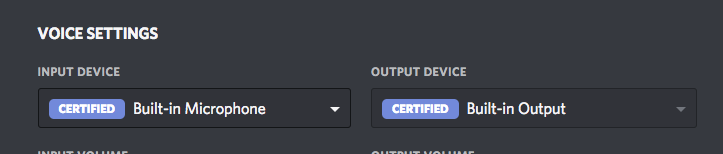
Yup, that's it. You give us the real-time info about any connected devices, and we'll handle the rest to make sure that anyone using your device will have an awesome experience. Your device will also have a CERTIFIED badge in Discord's audio settings, and really, who doesn't love badges?
Connecting
Section titled “Connecting”Query String Params
Section titled “Query String Params”| Name | Value | Required |
|---|---|---|
| v | 1 |
All |
| client_id | your app's client id | All |
| encoding | json |
WebSocket |
You can send event updates to the following URIs:
http://127.0.0.1:PORT/rpc?v=1&client_id=YOUR_CLIENT_IDWebSocket
Section titled “WebSocket”ws://127.0.0.1:PORT?v=1&client_id=YOUR_CLIENT_ID&encoding=jsonPORT is a range of ports from 6463 to 6473. You should iterate over these ports with your request until one returns a success response code or succeeds with a socket connection. Keep track of that port number for the rest of the session.
To keep your hardware in sync with Discord, send updates any time the hardware mute is toggled, or one of the voice features like echo cancellation is enabled or disabled by the user. This lets Discord get out of the way of your optimization when you're in control, or help out when you're not, ensuring an awesome experience for anyone using your hardware.
Each time you update, send a full array of devices, sorted by your preferred priority. That means if you want a specific headset to be the default that Discord will attempt to use, put it first in the array.
Getting Device UUID
Section titled “Getting Device UUID”For each device in the SET_CERTIFIED_DEVICES payload, there is an id field. This id should be the Windows device's UUID, retrieved through the native Windows API. You'll get back something that looks like {0.0.1.00000000}.{6cff2b76-44a8-46b9-b528-262ad8609d9f}.
Microphone Id Example
Section titled “Microphone Id Example”id = waveInMessage((HWAVEIN)IntToPtr(index),
DRV_QUERYFUNCTIONINSTANCEID,
(DWORD_PTR)pstrEndpointId,
cbEndpointId);Speaker Id Example
Section titled “Speaker Id Example”id = waveOutMessage((HWAVEIN)IntToPtr(index),
DRV_QUERYFUNCTIONINSTANCEID,
(DWORD_PTR)pstrEndpointId,
cbEndpointId);HTTP Example
Section titled “HTTP Example”HTTP Request Example
Section titled “HTTP Request Example”curl -X POST -H 'Content-Type: application/json' -d '
{
  "nonce": "9b4e9711-97f3-4f35-b047-32c82a51978e",
  "cmd": "SET_CERTIFIED_DEVICES",
  "args": {
    "devices": [
      {
        "type": "audioinput",
        "id": "{0.0.1.00000000}.{6cff2b76-44a8-46b9-b528-262ad8609d9f}",
        "vendor": {
          "name": "SteelSeries",
          "url": "https://steelseries.com"
        },
        "model": {
          "name": "Arctis 7",
          "url": "https://steelseries.com/gaming-headsets/arctis-7"
        },
        "related": ["{0.0.1.00000000}.{6cff2b76-44a8-46b9-b528-262ad8609d9f}"],
        "echo_cancellation": true,
        "noise_suppression": true,
        "automatic_gain_control": true,
        "hardware_mute": false
      }
    ]
  }
}
' http://127.0.0.1:PORT/rpc?v=1&client_id=YOUR_CLIENT_IDThe socket will respond with a 200 OK status code and the following JSON.
HTTP Response Example
Section titled “HTTP Response Example”{
"cmd": "SET_CERTIFIED_DEVICES",
"data": null,
"evt": null,
"nonce": "9b4e9711-97f3-4f35-b047-32c82a51978e"
}WebSocket Example
Section titled “WebSocket Example”RPC Command Example
Section titled “RPC Command Example”{
"nonce": "9b4e9711-97f3-4f35-b047-32c82a51978e",
"cmd": "SET_CERTIFIED_DEVICES",
"args": {
"devices": [
{
"type": "audioinput",
"id": "{0.0.1.00000000}.{6cff2b76-44a8-46b9-b528-262ad8609d9f}",
"vendor": {
"name": "SteelSeries",
"url": "https://steelseries.com"
},
"model": {
"name": "Arctis 7",
"url": "https://steelseries.com/gaming-headsets/arctis-7"
},
"related": ["{0.0.1.00000000}.{6cff2b76-44a8-46b9-b528-262ad8609d9f}"],
"echo_cancellation": true,
"noise_suppression": true,
"automatic_gain_control": true,
"hardware_mute": false
}
]
}
}RPC Response Example
Section titled “RPC Response Example”{
"nonce": "9b4e9711-97f3-4f35-b047-32c82a51978e",
"cmd": "SET_CERTIFIED_DEVICES",
"data": null,
"evt": null
}Models
Section titled “Models”Device Object
Section titled “Device Object”| Field | Type | Description |
|---|---|---|
| type | device type | the type of device |
| id | string | the device's Windows UUID |
| vendor | vendor object | the hardware vendor |
| model | model object | the model of the product |
| related | array of strings | UUIDs of related devices |
| echo_cancellation?* | boolean | if the device's native echo cancellation is enabled |
| noise_suppression?* | boolean | if the device's native noise suppression is enabled |
| automatic_gain_control?* | boolean | if the device's native automatic gain control is enabled |
| hardware_mute?* | boolean | if the device is hardware muted |
*These fields are only applicable for AUDIO_INPUT device types
Vendor Object
Section titled “Vendor Object”| Field | Type | Description |
|---|---|---|
| name | string | name of the vendor |
| url | string | url for the vendor |
Model Object
Section titled “Model Object”| Field | Type | Description |
|---|---|---|
| name | string | name of the model |
| url | string | url for the model |
Device Type
Section titled “Device Type”| Type | Value |
|---|---|
| AUDIO_INPUT | "audioinput" |
| AUDIO_OUTPUT | "audiooutput" |
| VIDEO_INPUT | "videoinput" |